A practical example: walking from public transport in Singapore
Gerry Ryan
Source:vignettes/singapore.Rmd
singapore.RmdHere we will calculate the walking travel time from the nearest mass transit station across the island nation of Singapore — specifically Mass Rapid Transit (MRT) and Light Rail Transit (LRT) stations — and create a map of this.
Prepare the data
For this exercise, we need two items of data:
- our points to calculate travel time from — here the locations of Singapore’s MRT and LRT stations, and
- our area of interest — in this case a map of Singapore.
Points
Our points of interest will be the stations data set
included in traveltime; a 563 row, 2 column
matrix containing the longitude (x) and
latitude (y) of all LRT and MRT station exits in Singapore
from 1:
library(traveltime)
head(stations)
#>             x        y
#> [1,] 103.9091 1.334922
#> [2,] 103.9335 1.336555
#> [3,] 103.8493 1.297699
#> [4,] 103.8508 1.299195
#> [5,] 103.9094 1.335311
#> [6,] 103.9389 1.344999
Area of interest
To obtain our area of interest, we download a national-level polygon
boundary of Singapore using the geodata package. Here we
download only the national boundary (level = 0) at a low
resolution (resolution = 2). Our boundary
singapore_shapefile is a SpatVector class
object from the package terra.
library(terra)
library(geodata)

singapore_shapefile <- gadm(
  country = "Singapore",
  level = 0,
  path = tempdir(),
  resolution = 2
)

singapore_shapefile
#> class       : SpatVector
#> geometry    : polygons
#> dimensions  : 1, 2  (geometries, attributes)
#> extent      : 103.6091, 104.0858, 1.1664, 1.4714  (xmin, xmax, ymin, ymax)
#> coord. ref. : lon/lat WGS 84 (EPSG:4326)
#> names       : GID_0   COUNTRY
#> type        : <chr>     <chr>
#> values      :   SGP Singapore
Friction surface
Now that we have the two items of data that we require initially, the next step is to prepare a friction surface for our area of interest.
We will use the friction surface from Weiss et al. (2020)2 that can
be downloaded by traveltime with the function
get_friction_surface(). This function takes extents in a
variety of formats and returns the surface for that extent only.
We can pass in our basemap singapore_shapefile, a
SpatVector, directly as the extent. We’re
interested in walking time from a station, so we’ll download the walking
friction surface by specifying surface = "walk2020".
(Alternatively, we could use surface = "motor2020" for
motorised travel).
We’re only interested in walking on land, so we then mask
out areas outside of the land boundary of
singapore_shapefile:
friction_singapore <- get_friction_surface(
    surface = "walk2020",
    extent = singapore_shapefile
  )|>
  mask(singapore_shapefile)
Thus we have our friction surface as a SpatRaster:
friction_singapore
#> class       : SpatRaster
#> size        : 37, 57, 1  (nrow, ncol, nlyr)
#> resolution  : 0.008333333, 0.008333333  (x, y)
#> extent      : 103.6083, 104.0833, 1.166667, 1.475  (xmin, xmax, ymin, ymax)
#> coord. ref. : lon/lat WGS 84 (EPSG:4326)
#> source(s)   : memory
#> varname     : Accessibility__202001_Global_Walking_Only_Friction_Surface_1.1664,103.6091,1.4714,104.0858
#> name        : friction_surface
#> min value   :            0.012
#> max value   :         0.061927
Input data
Below we plot the friction surface raster
friction_singapore, with the vector boundary
singapore_shapefile as a grey line, and
stations as grey points. traveltime takes
resistance values of friction (see paper for more details), so higher
values of friction indicate more time travelling across a given
cell.
library(tidyterra)
library(ggplot2)

ggplot() +
  geom_spatraster(
    data = friction_singapore
  ) +
  geom_spatvector(
    data = singapore_shapefile,
    fill = "transparent",
    col = "grey50"
  ) +
  geom_point(
    data = stations,
    aes(
      x = x,
      y = y
    ),
    col = "grey60",
    size = 0.5
  ) +
  scale_fill_viridis_c(
    option = "A",
    na.value = "transparent",
    direction = -1
  ) +
  labs(
    fill = "Resistance",
    x = NULL,
    y = NULL
  ) +
  theme_minimal()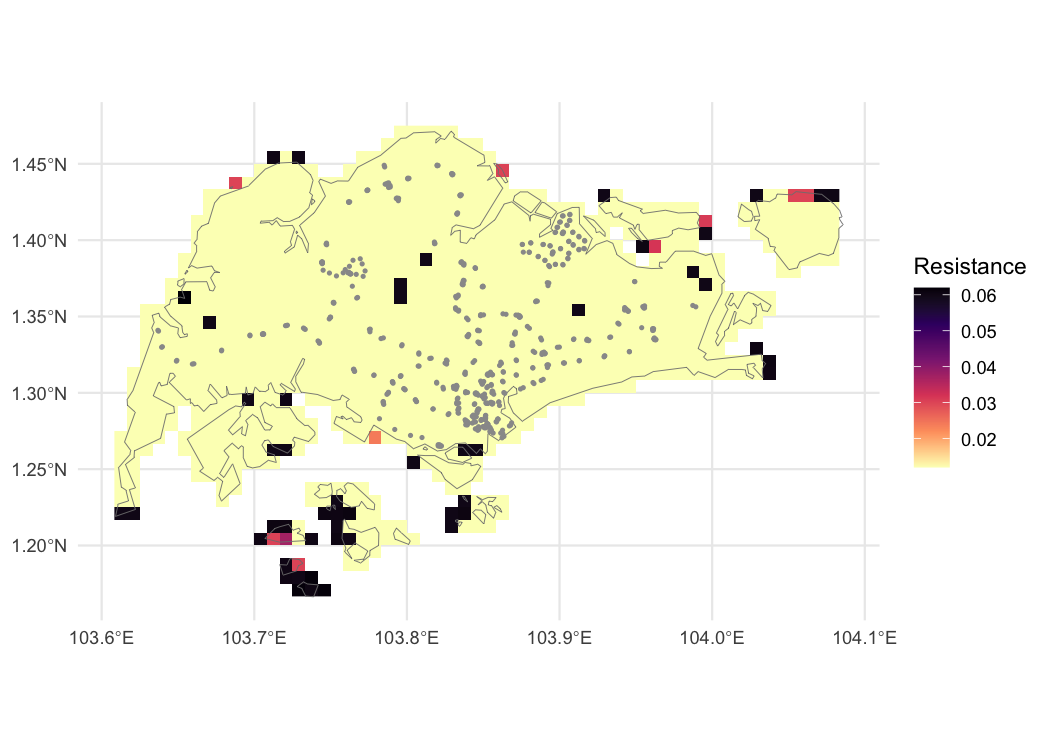
Friction surface raster of Singapore, showing Singapore boundary in grey, and station locations as grey points.
Calculate travel time
With all the data collected, the function
calculate_travel_time() takes the friction surface
friction_singapore and the points of interest in
stations, and returns a SpatRaster of walking
time in minutes to each cell from the nearest station:
travel_time_singapore <- calculate_travel_time(
  friction_surface = friction_singapore,
  points = stations
)

travel_time_singapore
#> class       : SpatRaster
#> size        : 37, 57, 1  (nrow, ncol, nlyr)
#> resolution  : 0.008333333, 0.008333333  (x, y)
#> extent      : 103.6083, 104.0833, 1.166667, 1.475  (xmin, xmax, ymin, ymax)
#> coord. ref. : lon/lat WGS 84 (EPSG:4326)
#> source(s)   : memory
#> varname     : Accessibility__202001_Global_Walking_Only_Friction_Surface_1.1664,103.6091,1.4714,104.0858
#> name        : travel_time
#> min value   :           0
#> max value   :   165.48359
Plot results
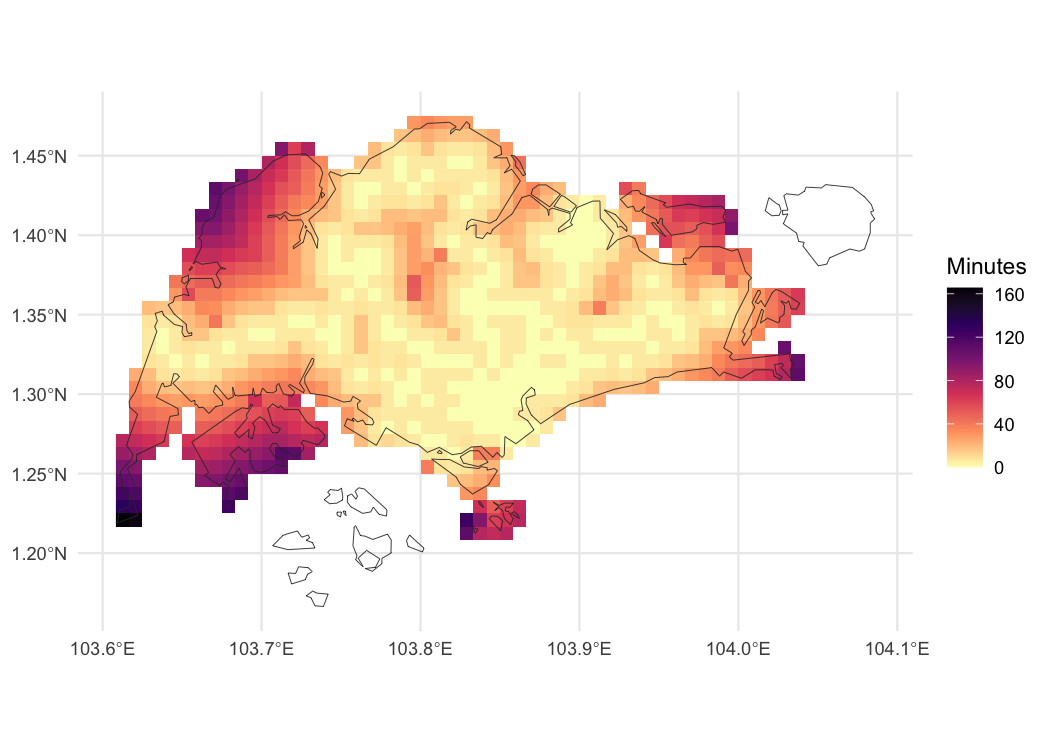
We present the resulting calculated travel times below where (as
expected) the travel times are lowest near station exits and
progressively higher further away. Note that some cells in
travel_time_singapore are NA. The islands to
the south and north-east are shown as filled cells in the figure above,
i.e., they are not masked out by singapore_shapefile. But
because those islands are not connected to any cells with a station,
they cannot be reached, so their travel time is NA and
these cells do not appear in the figure below.
ggplot() +
  geom_spatraster(
    data = travel_time_singapore
  ) +
  scale_fill_viridis_c(
    option = "A",
    direction = -1,
    na.value = "transparent"
  ) +
  theme_minimal() +
  labs(fill = "Minutes") +
  geom_spatvector(
    data = singapore_shapefile,
    fill = "transparent",
    col = "grey20"
  )
Map of walking travel time in Singapore, in minutes from nearest MRT or LRT station.